Showing posts with label Affinity Photo. Show all posts

May 22, 2024

Native American Dakota nation chief quote


This work I started as an analog airbrush with a physical airbrush gun and real paint on a T-shirt, that I photographed and edited extensively (adding plenty detail) in Affinity Photo many years later. I appreciate the Ctrl+Z and History of digital tools to get things closer to where the image is in my mind (without getting my fingers covered in paint). Digital art creation in my view is in no respect inferior to the traditional analog way of conceiving. It takes effort to reach the point where artists want to be, the tools they use are just different.


Most recent edit in Affinity Photo


In the early 90's of the previous century I discovered CorelDRAW as an amazing tool. Later I fiddled with Inkscape, after which I worked with Adobe Illustrator, Photoshop and InDesign on a professional basis. When Adobe started their ridiculously costly subscription model, I discovered Affinity suite and switched to those programs. Most recently I ran into the magnificent VectorStyler, so I guess I evolve along with the tools that become available to artists that are continuously looking for tools that help them express what is in their mind.


Click the image to see a larger version in Google's Lightbox


Halfway the 80's of the previous century I happened to run into a Native American lady of the Comanche nation, who lived on the edge of an Indian reservation, who told me a lot of her culture and what life is like in her area. It is nowhere near to the fake representation that the Hollywood moguls prefer to offer to the public. To unassuming people that live in a comfortable place in the West, it is bizarre and mind boggling what life is like in a place bordering a reservation. Even to those, like me, who live in a way that sets themself apart from most of the the common people in their area. In spite of the difficulties that minorities are forced to deal with, the spiritual wisdom of their ancestors remains lingering in the minds and hearts of their offspring.


December 4, 2022

Occult image retouching experiment


Affinity Designer is the program I use most from the Affinity suit and I haven't yet done a lot with Affinity Photo. So I thought it was time to do a little experimenting. I found an image of an occult statue on line, that intrigued me and used it to retouch it to my personal preference. I narrowed its wings and changed its face somewhat (among other things). As I wrote on my website, I am not a fluffy clouds and pink bunnies type of person, that I think reflect the denial of the perverted 'reality' in this dimension into which life was thrown. People's comfort zones for centuries have been squeezed into a infinitesimal bag of imposed rubble in which there is no room for the truth, because the high brow perverts and liars plan it to be a 'reality' controlled by those who keep the illusion.


I have to practice more with Affinity Photo, which I will do when I have more time. Being a vector drawing aficionado this type of work is a little out of my comfort zone, but looking outside of it probably is a good thing to do in this life, bearing in mind that many matters obviously are intentionally induced and imposed, which of course has an unknown purpose that does not necessarily concur with my intuition. To keep people thinking within the allowed space of reason a meticulously crafted comfort zone must be maintained that limits the people's perception; anyone who oversteps the limits of that zone is a danger to the hidden purpose against whom measures have to be taken so that his or her explorations beyond the allowed limits will not be shared with fellow open minded ones.

The plethora of organizations that perpetually issue a deluge of dogmas, laws and rules that they insist that people adhere to and obey, can not be the true purpose of life. People are born to be independent and allowed to think critically in order to develop an awareness with which they can find their way though space and time, that is hindered by increasingly strict policies that feel like traps put in place to do the bidding of those that do not want mankind to ever reach the outer boundaries of its potential, which is immeasurably rich and huge, but very difficult to achieve in this dimension.

So whether this image shows a representative of one the powers that suppress human potential or not is for those to decide that want to think open-mindedly and independently. It probably sends them on a rough ride, but that is what this dimension presents them. Perhaps there are other realms that do not limit man's potential in cruel and ruthless ways. Clinging to imposed comfort zone's limiting rubble gets no one anywhere, except into the venues of this world that is enforcing limitation and paradox.


November 12, 2022

Serif released version 2 of the Affinity programs


Introduction
Apart from raving reviews about Affinity's version 2 update by users that have not encountered difficulty installing the programs, there are installation problems for a number of users of the Windows platform that should not have occurred. After having waited for a long time to be able to download an upgrade that was not a Beta version, expectations of version 2 were quite high and running into problems installing the programs caught me and many other users by surprise. In this blog entry I will offer a constructive contribution to (temporarily) resolve this problem, expecting a company release soon that will enable successful installation, this being a situation that Serif must put behind them as soon as possible.

On the Affinity forum several work arounds have been suggested, most of which do not work for most users struck by the problem, which tempts people like me to search for other solutions that actually do work. Below you find one that resolved the problem I ran into, although I am aware that changes in the installation code have to be applied in order to avoid users having to apply work arounds or figure out themselves what to do, to install the version 2 programs of the Affinity suit successfully right out of the box. In this blog entry I will focus on Affinity Designer predominantly, since it is the suit's program that I used most often.


Programs will not install
The long awaited release of version 2 of Affinity Designer, Photo and Publisher has recently taken place. I purchased and downloaded them from the Affinity forum, but when I tried to install them I received a message that the installation was cancelled because an error occurred in parsing the apps (all three of them). The file format of the installation was msix. When browsing the forum I soon learned that this affected other users too. Several possible solutions were offered by the mods and advanced users, but none of them cured the problem for me. Later I downloaded the apps from the Microsoft Store, which was the beginning of a solution, since at least .exe-files were placed in WindowsApp directory in the Windows User directory, which isn't the location where Windows users, accustomed to the traditional installation process would expect the files to be placed.

The programs would only open by right clicking the .exe-file from the WindowsApp directory in the system disk and choosing the run as administrator option. They would not start from the Start menu or from the shortcut icons that I placed on the Taskbar. Also I was unable to open files I had drawn in the older Beta versions by dragging them from Windows Filemanager onto the desktop of the programs.

When diving into the problem at a certain point I discovered that the properties of the Affinity (sub)directories in the WindowsApps directory displayed a message that the Permission file was corrupted (in bold red type). I set the permissions to full control for myself and after that the programs opened without using the Run As Administrator command, from both the Start menu and the shortcuts I placed on the Taskbar.

Apparently the .msix files interfered with the user permissions of the Affinity (sub)directories in the WindowsApps directory, necessary to run the programs properly. This directory is located at C:\Users\UserName\Downloads on a Windows 10 system, in which the Affinity programs are in directories with the following name: affinity-designer-2.0.0.msix, in this case for Designer. After running the exe-files from this directory users are prompted to one time fill in their Affinity ID information and the programs appear in the Start menu from where they can be pinned to the Taskbar. Fortunately this problem does not affect all users, but to those that encounter this problem, it is a rather painful disappointment. 


Affinity Designer 2 start up screen


First impressions
I had become curious to the functionality increase of the version 2 programs after watching various Youtube videos that featured them and I must say I was happy to try them. There still are functions missing in Designer that are included in programs of the competition - such as the Mesh gradient tool (which I personally do not miss), the vector trace tool (that I never use), the shape blender tool (which would be nice), the vector eraser and liquify tools and the stroke width tool to name just a few, but overall the upgrades work well and I think they are somewhat worth the money, though Serif could have included more new tools. There is a temporary discount for buying all programs in the suit, a package deal, which is why I hesitantly decided to upgrade. It is a €120 one time payment - no subscription fee - for the entire suit, by the way.


Affinity Photo 2 start up screen


The shape builder tool is a long awaited function that the devs added, the knife / scissors tool as well and the versatile warp tool are absolutely great. In addition the UI has been improved, in particular the Layers panel. Check out the Affinity channel on Youtube, The Affinity Revolution channel, The Brown Bear channel, the Design made simple channel, Olivio Sarkas' channel, the Games From Scratch channel and Kru Mark's channel to get an idea of what the version 2 upgrade is all about. All these persons did an excellent job of exploring the version 2 programs from their own perspective, providing arguments for users to upgrade or not.


The problems for the developers
Kru Mark compares the upgrade to the functionality of Affinity's competition and there still are some tools missing that are included in Illustrator and Inkscape for instance, but for the type of work I create, they are not crucial. I am aware of the fact however, that there are users that would benefit from the missing functions as mentioned by Kru Mark. The improvements the devs actually did include in this version are a welcome addition and perhaps other improvements will be included in the upcoming Beta versions. But not including them in this version, is somewhat of a missed opportunity.

I think Serif was under a lot of pressure to release version 2, because it has been a rather long time since they released the previous upgrade, but I assume the stability of the programs in the suit is a major prerequisite, meaning more time and effort goes into programming and testing. But because Serif did not provide any information why the upgrade took so long, some users wondered if Affinity was dead...., a situation that could have been avoided by keeping users up to date concerning the development of version 2. Had Serif come up with buggy programs in its suit it might have resulted in a bad reputation that is extremely difficult to repair and therefore bad for business. Also the necessity of coding 3 programs to the next upgrade level simultaneously, may have accounted for the lengthy upgrade interval. 

Perhaps because of all these factors, the pressure on the devs in the Serif office was a bit too high, which may have resulted in the aforementioned installation problems, that could in fact be caused by Microsoft's installation policy, requiring companies to use the .msix files instead of traditional installation methods in which the running of .exe files places programs in the Program directory of the system disk or any other directory on any disk the user prefers to install it on. I think the changes necessary to integrate the version 2 suit with the Microsoft Store installation policy, may have given the devs a headache as well and resulting from that Serif's clients, that ran into bungled installations.


Affinity Publisher 2 start up screen


But since it is possible to correct them, I think the Serif team will be able to sort out the problems, but this should have taken place before the release.The installation engine may be separate from the rest of the program, but this is no concern of users - they just want thingsto work properly, which is what they paid for. Although at this point I am intensively experimenting with the absolutely brilliant VectorStyler program, I will still to use the Affinity suite for production purposes for the time being, because VectorStyler still in the development stage. But if Serif slows down the upgrade pace while VectorStyler steps it up, there will come a moment in future when I will make a different decision.

The reason of the update pace being quite low, perhaps has to do with the fact that the software is developed for Windows, Apple silicon - both the Mac OS and iPad version - and the fact that all three programs in the suit are integrated, which means when working in Publisher to make changes to vector art or pixel art Designer and Photo do not have to be opened separately, but all editing can be done from within Publisher. This Studio Link integration, that is the first of its kind in the graphics world and DTP business, will noticeably increase the artists' productivity.

Publisher by the way, can now be installed on the iPad as well, which adds a lot of value to Apple's tablet. because it makes the iPad the first tablet capable of running an (almost) full fledged DTP-program. A long awaited major tool that finally made it into the new Publisher for all platforms is the possibility to create footnotes, endnotes and side notes, which is a function any serious DTP-program must have. This integration of this tool makes Publisher's upgrade the most 'necessary' of the programs in the version 2 Affinity suit.


Conclusion
So, apart from some good aspects to this upgrade, there are too many bad ones, that are not mentioned in may other places on the web or elsewhere. Yet, a certain number of these things nevertheless are worth being put forward, because these programs have become (part of) the livelihood of many that continue to search for ways to survive crumbling economies and continuously soaring expenses. I have listed them below and added some related issues:

  1. The installation trouble for a number of Windows users should have been sorted out before the release of version 2. The mods on the forum should not be suggesting work arounds that require users to dive deep in their operating system (registry tweaks have been suggested), which could easily lead to breaking more than the average user is able to foresee, while most suggestions did not even resolve the problem. This situation should most definitely have been prevented
  2. As Kru Mark correctly reported, there still are several crucial functions missing in version 2 that, in view of the long time that has passed since the previous upgrade, could have been and should have been integrated
  3. Possible upgrades and / or additions of certain tools will most likely be presented in future Beta versions, that are by definition not stable. I one time received the advice in the forum not to use a certain Beta version, because it would not export .png-files properly (which apparently was a known issue, that did not occur in earlier versions....), which brings me to think: Why the heck issue that Beta version in the first place? Is it for users to test or to keep them happy by showing them development still is ongoing? And why would Serif release a Beta version that it advices users no to use? This is a weird type of advice to give to users that simply report that the program is not doing what it is supposed to do and (moreover) what it did correctly before, which makes the situation even more strange
  4. The reason I bought the various Serif products is because I loathe the overly expensive Adobe subscription policy, aside from the other type of disdain they display for their userbase, but I estimate Serif is now at a turning point on how to proceed in the market in which they are operating. The price of the Affinity programs has almost doubled compared to the period in which they were issued for the first time. They still charge a one time fee, but how long will Serif be able to determine its own policies in a time in which giant players simply buy companies that they deem to be interesting for their strategy - meaning: use their code or simply kill them off
  5. Innovation should be higher on the list of priorities of the Serif company, because its competition seems to extend their lead in this field. As a small player in the arena fighting the big boys, the lack of innovative progress is a danger riddled situation to be in, that leads to venues where no company wants to be
  6. The absence of a roadmap that indicates the planned progress of the future versions, is an ominous sign. Blender for instance, continuously updates their publicly issued road map and relatively swiftly integrates the announced improvements, while coding 3D software is necessarily more complex that coding 2D software. Serif not being transparent about where it is going with the suit's development, is rather odd, to say the least, because it leaves users in the dark about the direction in which the company aims to develop. It feels like hopping on an airplane and not knowing where one is going to end up
  7. The startup screens of all 3 programs in version 2 flash a message that the 'Microsoft Store registration is checked' each time the program is opened. It makes sense that Serif registers its users for obvious reasons, but I fail to see why it is necessary for Microsoft to register Affinity users, yet it demands every company that sells products through their store to amend their code. To what extent and in what way would be interesting to know. Particularly since Microsoft is not world famous for being overly concerned with the wellbeing of its users. This seemingly trivial detail could have far reaching consequences that only but very few users are capable of imagining in a society in which the increase of centralized control has gone beyond the type of measure that complies with democratic principles
  8. Almost immediately after buyers of version 2 ran into rather serious trouble - failed installation, not being able to open the programs and not being able to save files created (among a number of other bugs, most of which Serif has not yet resolved....) - this message appeared on the forum in bold white type on a red background at the top of each page: 'Our response time is longer than usual currently. We're working to answer users as quickly as possible and thank you for your continued patience.' Either Serif bit off more than it could chew with this release or other situations have occurred behind the scene that I prefer not to speculate on, but either way, this is bad news. Not being at least somewhat transparent about this towards its users / buyers does not help as well, because such conduct most certainly will provoke conjecture.


Minisforum HX90G


10 port USB 3 hub


Update December 21 2022

The new Minisforum Neptune HX90G mini PC arrived with Windows 11 and installation of the Affinity suit programs from the Microsoft store went without problems. More on running Windows 11 on this computer in this blog entry. So, upgrading to Windows 11 from my very old 2004 rig (first gen i7) cost me an arm and a leg. It includes the hardware - computer and USB hub - and Serif's Universal License. Corporate rule affects an increasing part of today's world.


October 17, 2022

Einstein analog / digital portrait


This is a proverbial combined freehand airbrush / Affinity Photo portrait of One Stone a.k.a. as Einstein, the relativity bloke. The man that urged Roosevelt to develop nuclear arms, that the US used to bomb Japan (twice) when the outcome of WW-II was already decided. In a long lost past I used to take up the airbrush gun and spray paint on different kinds of surfaces. With one or two exceptions always worked freehand, i.e. without any masking. 

Today, I work in the digital realm mostly, because it is convenient, less of a hassle and - most importantly - corrections are relatively easy to make in less time than is the case with an analog airbrush. I do sometimes however pick up the trusted Iwata or Harder & Steenbeck airbrushes to get my mind off things I need the time to process in a proper way; the old way of airbrushing works better to do such a thing than the digital stuff.

I used the Iwata HP-BH airbrush to spray the Inspire H2O paint on an old piece of paper that I had laying around. Very low air pressure, thinly diluted paint and Chillhop music to drift away, but not too far to be unable to do anything useful. To be honest, I like the HP-BH more than the Custom Micron, probably because I like different things better than what commonly is considered to be the best of the best. I was forced to buy the HP-BH on an airbrush show, after one of the visitors had stolen my Paasche V1 - which was the best tool ever - when I took a break and left the V1 unattended on the easel.

I dropped the HP-BH on the floor and because I never use the back cover of airbrushes, the needle was driven into the nozzle quite hard. I had to get it out using a pliers, because it was firmly stuck. However, the HP-BH kept on spraying like it never happened and I used the same needle and nozzle for years after the incident without any problem. I would not recommend hammering the needle into the nozzle before use, but I became convinced of the high quality of Iwata airbrushes.

Being a senior geezer, when finding an old airbrush painting, I see mistakes I made and correct them in Affinity Photo - a digital photo editing program, that resembles Photoshop, but is much much cheaper and equally as good or better. Check out my pixel paintings and vector portraits in my VectorWhiz website that you find here. Most recent stage at the top, older ones in chronological order, below it.


Digitally edited in Affinity Photo


On my DIY vertical light table


Analog airbrushed with Iwata HP-BH


Analog airbrushed with Iwata HP-BH


Early stage


December 27, 2021

Creating my personal crest in Affinity Designer and Photo


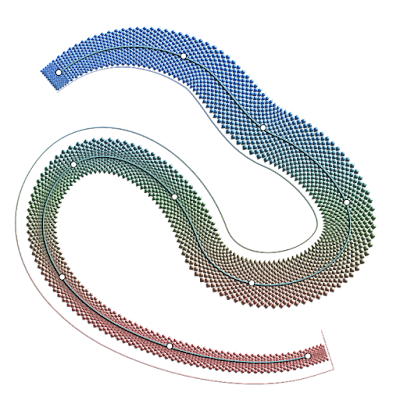
In this blog entry I briefly explain how I made my personal crest of which below you see the image. The main challenge was to find a way how to draw the snake's scale texture inside its winding body that also is narrower towards its tail section. After some trial and error I figured out a way to do it. 

The completed rendered drawing


First I did some testing in a separate drawing in order to be able to create the scales texture I had in my mind. To make the scales I drew and duplicated diamond shapes, with the result you see below. It is an early version, because the one I actually used, is too long for this blog, but this one gives a good idea of how I drew them. 

The first attempt to draw the base of a vector brush in Affinity Designer


After drawing these, I inverted the image and mesh warped it in Affinity Photo as is visible in the image below to kind of approach the texture width inside the winding and tapered body of the snake. It is possible to leave the diamonds unmeshed in a rectangular shape, but playing with the Stroke width only in Designer, to spread the scales properly over the body, leads to distortion of the texture. Hence this preliminary approximation. The inversion was done, because png's that are used for custom brushes must have a black background to make sure the brush has a transparent background once imported in Designer.

The brush visible above mesh warped and inverted in Affinity Photo


I created a png of the above and imported it in Affinity Designer as a New Texture Intensity Brush in Designer. In the Brush dialog I set the Size Variance to high in order to be able to tweak the brush's width to the desired value. If the Size Variance is left at default zero, it is impossible to tweak the width of the brush afterwards in the Stoke panel.


Then I did some testing in yet an other separate drawing that you see below. Tinkering with the stroke width in Affinity Designer and manipulating the node handles of the vector brush allows to get rid of unwanted interference of the scales. I then found out that I had to draw different brushes (particularly longer ones since the snake's body is of considerable length) in Designer that were edited in the same way as described above in Affinity Photo, to be able to make a more realistic scale texture. For such purposes trial and error to get things right is difficult to avoid. By the way, vector brushes can be given any (gradient) colour in Designer as demonstrated in the image below.

Testing of the (not clipped) vector brush in Affinity Designer


I drew the base for the texture with Designer's Pen tool, so that it could be edited accurately with the Node tool. Then I applied the Vector Brush to the stroke drawn with the Pen by double clicking on the Brush type, while the stroke is selected. Inside Designer I then clipped the vector brush inside the snake outline curve as is seen in the image below. I tweaked the brush widths in Designer's Stroke panel along the vector brush line to the proper values. Also, in the Effects panel I applied a colour overlay to tune the texture to the correct intensity.


The clipping of the custom made vector brush in Affinity Designer


Below is the deceptively simple screendump of the vector outline of this image. The essence of this drawing is within the effects applied (the feature rich Layer Adjustment & Layer Effect tools, Gradient fill tool for shapes and strokes, Gradient opacity tool) to the vector curves at which Affinity Designer excels. Attempting to match the vision in the mind's eye is a challenge, but the Affinity programs allow artists to come a long way.


Vector outline of the drawing


Finally in the Tone Mapping Persona of Affinity Photo, I enhanced the texture of the vector drawing, with the result that is visible in the image at the top of this blog entry. The Tone Mapping (to my surprise) resulted in a kind of patina effect to the shield, which I think is quite nice. It probably is the result of the multi node gradient colour function applied to the shield in combination with the Tone Mapping settings.

Note: The version of the brush I used in the end, is quite large (4208 x 164 pixels) in order to be able to properly render this image also in large sizes without getting a jagged and blurred appearance, because the drawing contains pixel elements in its complex non-linear textures.

My Chinese Zodiac sign is a Water Snake, which is the main feature of this personal crest. The meaning of the arched Latin text is 'Serpent Power' or 'Serpent Kingdom'. The X is a symbol of the Sun God who sustains life, secrecy or protection of (mystical) knowledge. The circle represents magical protection and sacred space. The mistletoes refer to protection against poisons and to mystical powers. 11 and 22 are master numbers pertaining to my birth date and name, according to the art of numerology. The infinity symbol at the bottom hints at my spiritual origin. Only after having reached the age of an elder was I considered to have grown sufficiently to understand that a symbol is worth a 1000 pictures. 

Hope this concise tutorial helps to create similar textures.


August 19, 2021

Geronimo - from analog airbrush to digital art


In the previous century I was deeply involved in the Dutch airbrush scene and sprayed a lot of portraits, in which a returning preference was the airbrushing of Native American chiefs and warriors. Some of those portraits were not finished or could use improvement. After the turn of the century I leaned more towards creating digital art and not too long ago I decided to rework the old portraits with digital means. One of those is the portrait of the famous Apache chief Geronimo of which you see various stages below.

While airbrushing with airbrush guns and paint I usually used the Iwata HP-BH airbrush gun and various paints, mainly Illu-Color and later Inspire H2O waterbased paint. In the digital episode of my life I initially used CorelPaint until that program began to crash more often than not, particularly when exporting work to the png format from Corel's cpt format. Some 5 years ago I accidentally ran into the Affinity suit and changed to Affinity Photo for pixel editing.

I gave the document a look that suggests a canvas background in Affinity Photo that I thought matched the portrait better. This is easy to do in Affinity Photo by using various Filters and Layer Effects. Digital art creation allows to make many different versions with different feel relatively easy, while printing techniques have evolved to a stage that makes it difficult to distinguish analog from digital art. In the case of this portrait I could for instance, choose to have it printed on canvas and give it a lacquer layer, which would give a convincing impression of authenticity to the observer.

I still like to pick up the Iwata's every now and then, but today my main focus is on digital art creation. It is an entirely different way to work, but unlike many airbrush purists, I like to endlessly fiddle in the software that allows to infinitely apply changes without the headache that that the traditional analog trade forces artists to make. The oldest stage - the unfinished analog airbrush - is at the bottom and the various digital tinkerings are above that. Click on one of the images to see them in Google's Lightbox that allows to flick through the images by turning the mouse's scroll wheel.


Fourth digital stage


Third digital stage


Second digital stage


First digital stage


Unfinished analog airbrush portrait


July 8, 2020

Vectorwhiz portfolio booklet


I have created a new portfolio in pdf the you find here, that you can download to view offline. The file size is 28 MB, so slow connections may need some time to download the document. I have resampled the images to 144 DPI (original resolution is 300 DPI) so that download time is limited while the appearance of the images remains acceptable.


Front cover page


This 88 page booklet was created in Affinity Publisher and contains:

  • vector portraits
  • vector paintings
  • vector illustrations
  • vector logos
  • vector T-shirt designs
  • pixel portraits
  • pixel paintings
  • 3D illustrations
  • 3D vector technical drawings
  • creative text - poetry


In the footer of each page in the document you find links to the TOC (table of contents) for easy navigation and a link to my website. The vector images were created in Affinity Designer, the pixel images in Affinity Photo and the 3D images in a 3D program named Rhinoceros v5. The poetry texts I usually create in Libre Office.

Affinity Publisher had trouble with the file for reasons so far unknown, but fortunately I was able to churn out a pdf file before it did. Publisher officially still is in Beta stage at this point, so it makes sense that things are not stable yet. I have good hope though that the developers of Serif (the owner of the Affinity programs) will be able to correct the bugs in a time not too far from now (July 2020).

My website - should you want to pay a visit  [wink wink, nudge nudge] - was made in Mobirise, the latest version of which seems to be much more stable than previous ones. Out of frustration about older Mobirise versions I wrote some unkind words about it (with good cause at the time) a few years back, but the latest version has not given any trouble so far.


February 17, 2020

Elvis Presley graphic vector poster


I haven't been able to post for a while, but here finally is a new work. It is a 100% vector graphical portrait of Elvis Presley that will be used to create posters and T-shirt prints. This type of drawing is far easier to make and less time consuming than the photo-realistic vector portraits I have been creating so far. I started to draw a simple vector portrait that looks like this:


Graphic style vector portrait of Elvis Presley


Then I created the type in Affinity Photo, because it has a distortion tool that allows to manipulate text into geometric shapes. These pixel shapes I manually traced in Affinity Designer and placed the portrait of Elvis in the same document, which resulted in this image:


Poster / T-shirt design


The portrait was drawn in a few hours, the text took a bit longer. I am still honing my skills in this type of work and from experience I know it will get better within a short period of time. Once I am satisfied with my progress I will post the results and place the designs in my T-shirt shop. Look for this shirt here, which would look like this:


Elvis T-shirt


The shop allows you to personalize the size and positioning of the image, choose the colour of the T-shirt (although I think black is the best option for this design).


November 23, 2019

Digitally edited freehand airbrush of Johan Cruijff


The image below shows a digitally edited photo of Johan Cruijff that originally was a traditional analog freehand airbrush that got sort of 'lost'. Fortunately I had shot a photograph of it that I recently reworked in Affinity Photo. The beefed up digital size is 108 x 82 centimeters. It shows a young Cruijff while he still played for Ajax Amsterdam before he moved to FC Barcelona. Click the image to see a larger version of it in Google's Lightbox.


Edited freehand airbrush of Johan Cruijff


I rarely touch the analog airbrush anymore - the type that needs to be hooked up to a compressor. I believe digital image creation and editing software offer so many advantages over analog means of art creation that it made the choice easy for me. Working with computers does not mean the creative element goes away - there most definitely are methods that allow artists to preserve or even enhance the essence of the person that they portray. It just is a different way of working.

The limitless number of undo and history functions that Affinity programs have, are an obvious plus, while working in layers is an other thing that analog methods do not offer. Being able to work in multiple layers each of which has a wide range of functions is a real boost for artists' creativity. In addition the numerous filters that editing and creating software provide, open up new worlds for creative manipulation of images. All these features put together spurred me to make to make the switch from analog to digital art creation and editing. 

A thing that may cause to think, is that in traditional drawing for instance, artists have 3 tools - a pencil, eraser and paper stump, while the tool boxes of drawing programs offer many more. Also the number of colours are without limit. And these are only the tools; other functions are left unmentioned. In no way am I putting down traditional ways of creating art, I am just beginning to explore the possibilities of digital art creation. So far, I like it a lot. 


September 25, 2019

Changing Native American portrait

I used to airbrush a lot - the analogue type in which a real metal airbrush is hooked up to a compressor to spray real paint on a real surface. That started in the early 80's of the previous century and lasted until approximately 8 to 10 years ago. After that I became more interested in digital image creation and manipulation, also because the programs became better and allowed to approach the quality that traditional airbrushing did. Today, the quality of the digital image creation programs has surpassed the traditional way of working in the sense that it is able to create more accurate detail that, in addition, can be edited endlessly.

I used to mainly use CorelDRAW and Corel PhotoPaint for my personal projects and during the day worked professionally with the Adobe products in the office. Sometimes I used Illustrator and Photoshop for my personal projects as well, but I always found their programs way overpriced. Things got worse when they imposed their subscription model on their users after which I switched to Serif's Affinity Designer (vector drawing program) and Affinity Photo (pixel creating and editing program). I accidentally ran into these programs when aimlessly browsing the Internet.

I've truly fallen in love with the Affinity programs that both cost about 50 USD that give you ownership of the programs and 3 free updates.... That is a whole lot more affordable than the programs in the Adobe suit. Designer and Photo are developing well - bugs are continuously removed and functions are added - which causes them to almost be on par with AI and PS functions wise, while having surpassed them in a certain number of aspects. I may elaborate on this in a future blog entry. In addition Serif issued Affinity Publisher which is and InDesign competitor. Already now Publisher is sufficiently equipped with functions to do by far the most DTP work very well while only lacking compared to ID in very specialist areas like interactive digital publications for instance. But artists that work in that type of document creation are relatively small numbered.

OK, back to what I was going to express here. Sometimes when I get bored, I tinker with images in Affinity Photo. In the old days I used to airbrush a lot of portraits of Native American people. But when browsing the web, it occurred to me that many artists create portraits of the same people, simply because there weren't too many photographers to record faces of Native American people in the old days. In order to create a unique face one has to be created from scratch or an existing one has to be changed so that it looks nothing like the original, trying to preserve the ethnic facial traits of the subject. Gertrude Kasebier and Edward S. Curtis are two of the best known magnificent photographers who shot a large number of great Native American portraits. But in their day, it wasn't like everyone had a camera on their smartphone like people have these days. It is why a relatively small number of genuine photographs of Native Americans exist.

So when I find a photo of a Native American person that I potentially would like to airbrush, but I find elements in their facial traits that I would like to change, I load the photo into Affinity Photo and start tinkering. Some would say that this is historic fraud, which in fact is the case to a certain extent, but that could also be said of the paintings of the brilliant Howard Terpning who I am sure interprets some things according to his personal vision (which is what makes his art so awesome). Personally I enjoy watching Terpning's work. Perhaps a little more and focused on details than the average person, because I want to know where the beauty of art is hiding in the details.

Below you find a brief sequence of me changing a portrait that I found on the web. At the bottom is the original photo. Above that the alterations made in Affinity Photo - mainly using the Liquify Push Forward Tool in the Liquify Persona. The image above that shows more detailing done with the Paint Brush Tool (using a textured brush), The Blur Brush Tool and the Clone Brush Tool. I also used the Color Adjustment and Curve Adjustment filters to make the image more crisp and dramatic. Finally I placed the edited image in a frame in the 3D program Rhinoceros v5 as show in the image at the top. I enjoyed doing this piece of historic fraud that I think turned out quite well considering the original photo was small and of a low resolution (600 x 938 pixels), while damages were present both in the face and in the background.

Tip: click on one of the image and it will be displayed in Google's Lightbox. If you are on a PC (also possible on a Mac I presume) you can turn the scroll wheel of your mouse and flick through the images to compare them.


Placed the edited image in a virtual 3D frame


Image edited with Paint-, Blur- and Clone- Brush tools
to add detail and Colour and Curve Adjustment filters
to make the image more crisp and dramatic looking


Photo edited with the Liquify tool and
Blur tool to remove jagged edges on areas


Reference photo, which was small, low res,
damaged and jagged


June 21, 2018

Youtube channel shop window image

This concept image was an experiment created in Affinity Photo beta version 1.6.5.112. I just threw in some objects that I thought were appropriate to be in the image and beyond that I find people that explain particular pieces of art to those they consider to be ignorant to the subject quite appalling, to be honest. I would like to add for the sake of clarity that I don't consider this collage to be art in the sense that I perceive what real art is, but it is a linguistic limitation that drove me to use the word.


The two identical neon signs behind the window glass were created in Rhinoceros (to create the shapes) and edited in Cinema 4D (to assign the materials to the objects) before being placed in Affinity Photo. The .aphoto-file was exported to png, then imported again into AP again and in the Tone Editing persona given one of the standard HDR treatments - Dramatic - plus some minor tweaks to enhance the image quality to somewhere in between realistic and HDR effect.

I just visited a forum in which two artists quibbled about their art calling the other person's scrabbles 'IKEA-art' and meaningless, which actually were accurate perceptions. It becomes weird when looking at the art of the two artists who both make IKEA type of rubbish, one admitting it and the other thinking that is an unjust qualification of the type of art that he makes. So each of them doodles IKEA-bunk and criticises the other for making meaningless IKEA-drivel. Communication on this level beyond me. Might be a case of Dunning-Kruger.

Anyhow, this is why I don't like explaining what I do, i.e. where it concerns art / design. What's more, I'd rather die than produce 'art' that would make a three year old feel embarrassed. If people don't get it, it's not my problem, if they do, good for them. I admit that this kind of response is easily mistaken for sociopathic demeanour, but you just can't make a person think outside of his or her ambit. Oh, and b.t.w. below you see the image that I used as a reference. Have a nice day!


March 7, 2018

Native American Paintings

I've always felt attracted to the Native American way of life and their often spectacular appearance. Needless to say I was intrigued by the work of photographers Edward S. Curtis and Getrude Kasebier and painter Howard Terpning. They captured an age and shortly after which Native American people were brutally massacred by the invaders of their land. An estimated 100 million ( ! ! ! ) Native American people were slaughtered; the biggest genocide perpetuated in modern history. Yet only few are aware of this as a result of intentional falsification of historic records and the (mis)conduct of current broadcasters that either distort facts or omit them on order of the descendants of those that committed the cleansing.

The indigenous people's closely related spiritual approach to life and and its oneness with nature is without doubt the fact that appealed to me most, because I intuitively sensed that this is how beings in this material realm would perhaps one time be able to return to their original, majestic and magical existence. All is transient - some situations are ended by violent interference while others sought harmonious ways to transform. I believe the latter is the process that the Native American people attempted to do. I realize of course that there were wars between various Native American nations, but consider such to be the consequence of the ominous legacy that this material realm imposes on all life forms present in it.

I made two digital paintings so far (that are more or less finished) that depict the Native American life style. Both of which contain rifles, which is some sort of symbol that reflects their battle with the invaders that brought an entirely different way of living to the North-American continent. Also visible in the paintings are the traditional dresses, hair styles and environment. I chose to show these paintings in frames, because that is how they would look once they were giclee-printed, which is the goal of every painter. I used a computer to create them, so that they would be preserved beyond the life span of traditional materials. I started creating them in Corel PhotoPain(t), but after it continued to crash, I switched to Affinity Photo that has an UI that I find pleasant to work with.

Please click the images to see the paintings in full screen full HD resolution.


Tribe gathering


Peace Pipes & Winchesters


Lakota warrior 'Kills First'


Proud Men


Powow


Kiowa warrior